Sunday, 20 February 2011
Standing out
This show is about highlighting the new equipment that will be appearing in the shops over the next few months; and although most of the equipment on show was home entertainment of some sort, TV's, Blu-ray player, Home cinema there was a big selection of cameras and video cameras which held the biggest interest for me.
Over the last couple of years there has been a big upsurge in 3-D films and 3-D televisions, this was noticeable at the show plenty of 3-D TV's on show, including a 150 in one!!!
So what's this to do with the outdoors, I hear you ask. Well Panasonic are introducing cameras and lens that are capable of taking 3-D pictures.
3-D this is nothing new as we have fads of it back in the 50s and cinema has always dabbled in it, I even have some stereoscopic pictures that go back to the 1860s.
Panasonic are not only making lens for their G Micro cameras but also for their video cameras too, which means that amateurs now get the chance to make 3-D movies.
I had a play with both the G2 and the GH2 with the 3-D lens attached and was really surprised at how good the results were, although these were viewed on a 50 in TV.
The 3-D lens for the video cameras also seems to process good video.
Obviously these new lens come at a fairly high price but it is good to see the ability to capture 3-D is coming to the digital amateur market.
Friday, 12 December 2008
How to S**t in the Woods
Personally I'm happier using video than the written word. For me writing is a chore; it can take me quite a while to compose a piece for the blog, sometimes so long that I end up not posting it because it has taken so long; I have moved on to a different subject.
Another reason is that I have to have the spelling checked and this means more time lost. In fact this post has been days in the making.
I have always like playing around with film is some manner, be it old super 8 cinefilm to early VHS/Beatmax tape to the latest Mp4 cameras.
So for me video is an easier way of adding content to the blog, it's still the same old stuff, just presented in a different way.
Over the next year I expect to see a lot more video content appearing on the various blogs; how many will stay with it is unknown, some may find that the time and effort in editing and uploading to YouTube is more time consuming than writing a post, some with embracing it and help to move the genre on.
It looks like in the coming months; video Vs the word, with become the new tents Vs tarps.
I'm quite looking forward to the new batch of vloggers
One way that I believe video can beat the written word is when to comes to demonstrating either an idea, item or a technique.
The video below shows how to deal with a subject that a lot of people would shy away from, the video shows the humourous side of s**tting in the woods.
Although the written word could describe the techniques I don't think to could bring the homour.
Video 1 Written 0
:-)
Monday, 13 October 2008
Being Naughty
One of the areas I'm looking at are wild camping sites; now while its possible to legally wild camp in most areas of Scotland, it is nice to have a rough idea of where to camp. I have been looking at the maps and this gives a reasonable idea of what the terrain looks like but not what is actually like in really life.
I've just found a site (well not really found; as I had posted photographs to it before but had complete forgotten about it) that helps turn the maps into real life.
The site is The Geograph British Isles project which 'aims to collect geographically representative photographs and information for every square kilometre of Great Britain & Ireland' which means a photograph of ever km square on the OS maps.
So if I want to see what a particular area looks like and if there is a chance of a wild pitch there; I can input the Grid Ref and a get a photograph of the area.
NO6484 is in and around the Bridge of Dye and this gives a good picture of what I would find around there (looks a good spot to camp) and of course if I want to see what is around Charr bothy I can.
I'm not to sure how the challenge purists will see this but for me it's an aid as much as the maps are.
Thursday, 2 October 2008
Back to the Future
The original londonbackpacker; this was the first website I had, it had only been going a few months.
There are some familiar faces that look a bit different
Chris Townsend
Blogger
Leoville
and some things that haven't been invented yet
YouTube
Podcasting
Wednesday, 23 January 2008
EEE PC Review
Some stats on the machine first:
Weight 900 gm
900Mhz Intel Celeron-M processor
800 x 400 pixel screen resolution
3 Usb 2.0 ports
VGA output
Ethernet socket
Webcam
Stereo speakers
Headphone & mic sockets
Built-in mic
SD card slot
Built-in WiFi
Flash storage
I have the standard white 4Gb, 512Mb ram machine; which can be upgrade to 2Gb ram.
The OS in a special version of Xandros Linux. There are a host of open source programs pre-loaded, which include OpenOffice for word processing, spreadsheets and the like.
There are a couple of media players for playing MP3's and video., there is also a a voice recorder.

The EEE PC & Psion Revo
So far; I have been using the E3 for most of my computing usage; writing emails, surfing the web and some word processing. The E3 has worked well for all these, the keyboard is a bit small and the keys are a bit flimsy to the touch. If you are a touch typist it will be a strange experience but as a two fingered typist, I`m not finding it to much trouble.
The Wifi works pretty well in all parts of the house, I haven't tried it out and about yet.
The web browser is Firefox and the email is web based and has tabs for most of the major email web based players.
All the web pages load O.K and look good on the screen, video channel play the same as on my main computer.
The machine only takes 15-20 seconds to boot up and normally starts in the easy desktop, this is the default setting.

Easy desktop
The easy desktop has tabs across the top for the major areas of usage and subsections within them.
Everything is pretty straight forward and getting start doesn't even require the user manual.
The desktop can be changed to advanced mode, which requires a download. This then looks like a normal Windows/Mac desktop.

Advanced mode
There is a good user group for the E3 and also a Wiki; this is where I found out about how to chance the desktop.
All of my USB devices; Aiptek camera, MP3 player and USB flash key have all been recognised by the machine.
Battery life is about 3-4 hours even with the Wifi switched on.
I have found that the webcam is O.K when viewing but the actual recording seems very jerky and not to clear.
The machine is really designed for children and does look like a toy but it is a really neat little machine.
The biggest advantage over the Psion is the WiFi; with so many hotspots around it means getting that all important blog entry in quickly.
Sizewise you wouldn't want to take it backpacking but overall this a useful machine for quickly checking emails, a bit of surfing and some word processing.
Friday, 18 January 2008
I`m Free, EEE PC
Well not exactly free but wireless.
I`ve finally gotten around to buying a router and setting the home PC to a wireless connection.
The main reason for this is so I can connect my latest gadget to the internet, and the latest gadget is the Asus EEE PC.
The EEE is small and very portable; it's about the size of an A4 sheet of paper, weighs about a kilo, has wifi and looks great. It even has a 0.3 mp webcam built-in.
I'm typing this blog entry on it and the keyboard is big enough even for my large fingers.
The OS is linux but it can run windows XP, I'll have to look into the ways to run that but at present the linux OS works fine.
There's no HD but a 4GB solid-state flash storage 'disk', there are 3 USB ports and VGA port and a combined SD/MMC card slot, so memory cards from a digital camera can be accessed.
A big step up from my old psion Revo.
Saturday, 5 May 2007
Playing with Video
All the video's are put together in Windows Movie Maker (WMM) which comes with all versions of Windows, for the moving photographs I use PhotoStory 3 which can be downloaded from Microsoft.
In WMM the movie video's can be saving in a multitude of ways i.e. DV-Avi for high quality video to 'video for dial up (38kbps)'; I normally save my movies at 768kbps. Once the video clips are made into a movie, they are uploaded to Youtube. When the files are uploaded; Youtube converts them to flash files (.flv) and compresses them down to about 300kbps, this is why the pictures can look badly pixelated sometimes.
Over the past couple of weeks I have been looking at ways to try and get a better video up but this can only be achieved by having the original 768kbps file playing.
One site that seems to allow this is upfordown.com with them you get 500MB Space, 5GB Bandwidth monthly, max file upload 50MB.
Using this service does mean a little bit of work on the users part as you have to work out the html code to make a player, play on your blog, unlike Youtube where you can just grab the code and embed it in the blog.
Obviously little review items like the freeloader one, can be saved at a lower kbps I saved that at 512kbps mainly because the picture didn't need to look that clear and a bit of pixelation doesn't matter that much.
Below are two video clips of the same video, saved at 768kbps on WMM. The file size is 7.5 MB
The first is the Youtube one, the second is hosted on upfordown.
When both clips are played together you can see the difference in the picture quality especially in areas like the font on the opening; the second one is much sharper and clearer, also the water and sky looks smooth and not blurred.
Clearly the video's are never going to be the same as a DV-mini camera or HD but with any luck I will be able to post a much better quality video in future.
Monday, 16 October 2006
Digital Technology
With the avent of the internet, we have been able to find out so much more information, throught the likes of dedicated websites such as walking forums, people's personal blogs and most recently podcasts.
We are also able to obtain equipment from virtually anywhere in the world (even if we do get clobbed with import taxes!!).
Digital cameras have given us the ability to have instant pictures, no more waiting a week for the prints to come back from the chemist and then being disappointed and wishing you could go back and try to capture the picture again (or is that just me).
Handheld GPS's are another way that digital technology is helping us, by being able to put us within a couple of metres of where we want to be, anywhere in the world.
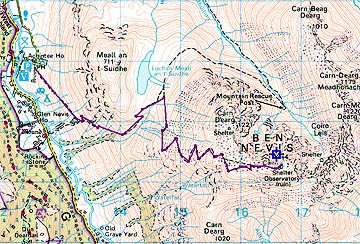
The biggest piece of digital technology I have found useful are digital maps.
In the past; I would have to lay a map out across the kitchen table and then try to map out a route, use a map measurer to work out the distances covered. One area I could never work out was total ascent and decents mainly because I found it just to difficult.
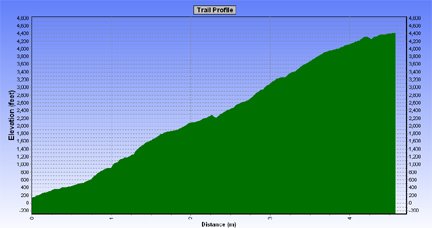
Now with digital maps; I can plot a route on screen, I can change it and not have to re-measure the distance. I can check the total ascent & descent with the click of the mouse.
Profile
I don't have the problem where a route will go onto another map which I don't have, as digital maps are seamless. I also have the ability to save the routes and then download them into a GPS.
There are some drawbacks with digital maps, they are expensive (but in the long run you do save money). You can't buy the whole country in 1:25000, so it has to be 1:50000 but you can print out at different scales ranging form 1:1000000 to 1:10000, although the best scaling are either 1:50000, 1:25334 or 1:25000 but all the scalings are only enlargements of the 1:50000.
Another problem is that you can only print up to A4 in size.
Apart from these few small problems, digital maps are definitely the way to go.